/
Design Hub
/
Calculators & Simulation
/
QSPICE

QSPICE®

The next generation of SPICE is here.

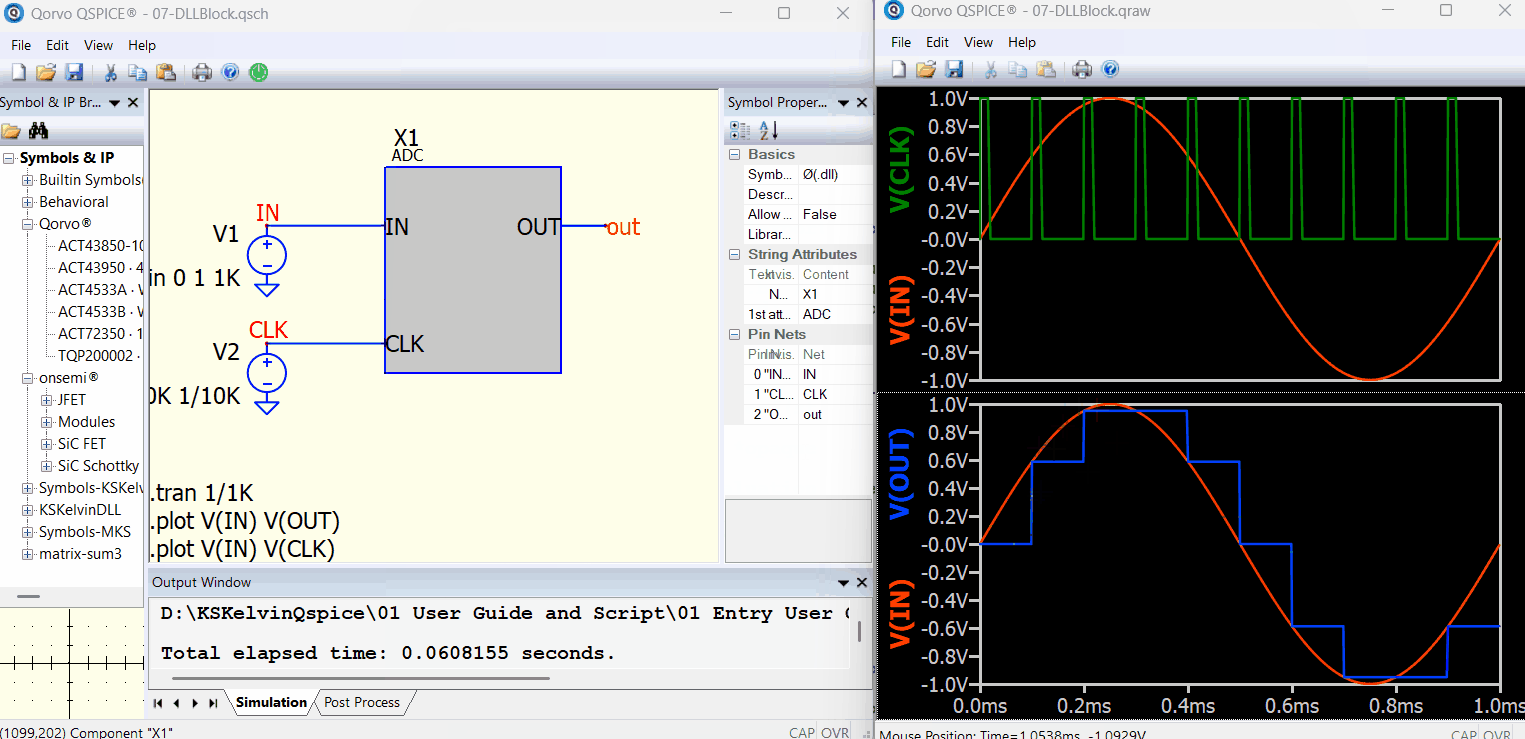
QSPICE circuit simulation software helps engineers design faster and smarter. QSPICE is a powerful downloadable program that runs locally on your computer, delivering high-performance simulation with frequent updates that continuously enhance features, capabilities, and accuracy. From initial concept through final validation, QSPICE helps streamline design workflows and accelerate development.
Get QSPICE Now
Benefits
    Better SPICE basics: higher simulation speed, functionality, accuracy and reliability

    Better SPICE basics: higher simulation speed, functionality, accuracy and reliability

    Supports massive amounts of digital

    Supports massive amounts of digital

    Free for commercial use

    Free for commercial use

    Create MOSFET, diode and JFET models in minutes

    Create MOSFET, diode and JFET models in minutes

    C++/Verilog compilers included

    C++/Verilog compilers included

    Publication-quality graphics

    Publication-quality graphics

System Requirements:
  • Windows 11 or a 64-bit edition of Windows 10
  • 4 GB RAM minimum (16 GB recommended)
  • 100 MB disk space for software installation
  • At least 16 GB disk space for simulation data

Technical Forums

Connect with our experts for guidance and insight on MatchCalc and our other RF tools by going to our Qorvo Forums and clicking on the RF Solutions tab.

Go to Forums

Start Your Design With QSPICE

Move faster with key design content.

QuickStart Guide for QSPICE® Simulation Tool

QuickStart Guide for QSPICE® Simulation Tool

Beginner Tutorial for QSPICE.

Connect with our experts and your peers in the QSPICE Technical Forum.

Jun 16, 2026

Using C++ and Verilog in QSPICE

Creator Mike Engelhardt talks step-by-step how to use C++ and Verilog in the new QSPICE® simulator tool with detailed and easy-to-follow examples. Visit our QSPICE landing page to learn more and download QSPICE software.

Jul 21, 2023

From Schematic to Simulation in Minutes

Create QSPICE models quickly and accelerate your simulation workflow.

Mar 4, 2025

Advanced QSPICE Videos

Search Professor Marcos Alonso's YouTube videos for advanced tutorials.

Jun 16, 2026

Need help?

If you need support with any of our advanced tools or want to share feedback, get in touch with us.

Email support

Need more support?

At Qorvo, our customers are a core part of what we do, and we want every experience you have with us to be as reliable as our products. If you have a question or if something isn't working the way you expect, please let us know.

Forum

Forum

Engage with the Qorvo community, ask technical questions and share insights.

Support

Support

Get technical, application or customer support plus updates on supply chain and FAQs.

Sales

Sales

Connect with our sales team to gain tailored solutions, expert guidance and access to the latest technologies.
Stay up to date with us.

Sign up for notification on new products, product/process change notifications (PCNs) and end of life (EOL) alerts.

Sign Up

Qorvo products are at work connecting, protecting and powering the planet. We bring core radio frequency (RF) and power technologies and solutions to automotive, consumer, defense & aerospace, industrial & enterprise, infrastructure and mobile markets.

Stay Connected

  • Facebook
  • X
  • LinkedIn
  • YouTube
  • Products
  • Solutions
  • Design Hub
  • New Products
  • Product Compliance
  • Blog Posts
  • Events & Trade Shows
  • News Releases
  • Success Stories
  • Technical Articles
  • About Us
  • Careers
  • Corporate Videos
  • Quality
  • Locations
  • Investors
  • How to Buy
  • Forums
  • Portals
  • Contact Us
  • Subscription Center
Site MapFeedbackLegalPrivacySupply Chain Transparency

© 2026 Qorvo US, Inc

|

+1-833-641-3810

/
Design Hub
/
Calculators & Simulation
/
QSPICE

QSPICE®

The next generation of SPICE is here.

QSPICE circuit simulation software helps engineers design faster and smarter. QSPICE is a powerful downloadable program that runs locally on your computer, delivering high-performance simulation with frequent updates that continuously enhance features, capabilities, and accuracy. From initial concept through final validation, QSPICE helps streamline design workflows and accelerate development.
Get QSPICE Now
Benefits
    Better SPICE basics: higher simulation speed, functionality, accuracy and reliability

    Better SPICE basics: higher simulation speed, functionality, accuracy and reliability

    Supports massive amounts of digital

    Supports massive amounts of digital

    Free for commercial use

    Free for commercial use

    Create MOSFET, diode and JFET models in minutes

    Create MOSFET, diode and JFET models in minutes

    C++/Verilog compilers included

    C++/Verilog compilers included

    Publication-quality graphics

    Publication-quality graphics

System Requirements:
  • Windows 11 or a 64-bit edition of Windows 10
  • 4 GB RAM minimum (16 GB recommended)
  • 100 MB disk space for software installation
  • At least 16 GB disk space for simulation data

Technical Forums

Connect with our experts for guidance and insight on MatchCalc and our other RF tools by going to our Qorvo Forums and clicking on the RF Solutions tab.

Go to Forums

Start Your Design With QSPICE

Move faster with key design content.

QuickStart Guide for QSPICE® Simulation Tool

QuickStart Guide for QSPICE® Simulation Tool

Beginner Tutorial for QSPICE.

Connect with our experts and your peers in the QSPICE Technical Forum.

Jun 16, 2026

Using C++ and Verilog in QSPICE

Creator Mike Engelhardt talks step-by-step how to use C++ and Verilog in the new QSPICE® simulator tool with detailed and easy-to-follow examples. Visit our QSPICE landing page to learn more and download QSPICE software.

Jul 21, 2023

From Schematic to Simulation in Minutes

Create QSPICE models quickly and accelerate your simulation workflow.

Mar 4, 2025

Advanced QSPICE Videos

Search Professor Marcos Alonso's YouTube videos for advanced tutorials.

Jun 16, 2026

Need help?

If you need support with any of our advanced tools or want to share feedback, get in touch with us.

Email support

Need more support?

At Qorvo, our customers are a core part of what we do, and we want every experience you have with us to be as reliable as our products. If you have a question or if something isn't working the way you expect, please let us know.

Forum

Forum

Engage with the Qorvo community, ask technical questions and share insights.

Support

Support

Get technical, application or customer support plus updates on supply chain and FAQs.

Sales

Sales

Connect with our sales team to gain tailored solutions, expert guidance and access to the latest technologies.

Stay up to date with us.

Sign up for notification on new products, product/process change notifications (PCNs) and end of life (EOL) alerts.

Sign Up

Qorvo products are at work connecting, protecting and powering the planet. We bring core radio frequency (RF) and power technologies and solutions to automotive, consumer, defense & aerospace, industrial & enterprise, infrastructure and mobile markets.

Stay Connected

  • Facebook
  • X
  • LinkedIn
  • YouTube
  • Products
  • Solutions
  • Design Hub
  • New Products
  • Product Compliance
  • Blog Posts
  • Events & Trade Shows
  • News Releases
  • Success Stories
  • Technical Articles
  • About Us
  • Careers
  • Corporate Videos
  • Quality
  • Locations
  • Investors
  • How to Buy
  • Forums
  • Portals
  • Contact Us
  • Subscription Center
Site MapFeedbackLegalPrivacySupply Chain Transparency

© 2026 Qorvo US, Inc

|

+1-833-641-3810

Qorvo
  • Products
  • Solutions
  • Design Hub
  • Support
  • About Us
Qorvo
Qorvo
Qorvo
  • Products
  • Solutions
  • Design Hub
  • Support
  • About Us
Qorvo
Qorvo